
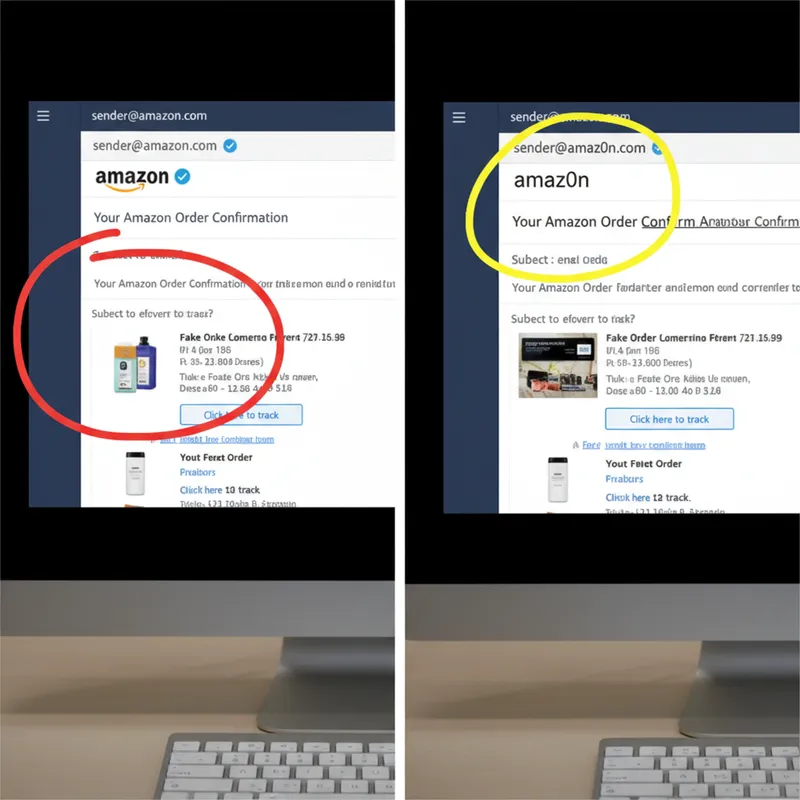
You get an email from Amazon about a problem with your order. The link looks right at first glance. But look closer — that's not amazon.com, it's amaz0n.com. That zero where the 'o' should be? That's typosquatting.
What is Typosquatting?
Typosquatting is when attackers register domain names that look almost identical to legitimate ones. They're counting on you not noticing the difference — especially when you're busy, stressed, or just not paying attention.
Common tricks include:
- Letter swaps: amaz0n.com (zero for 'o')
- Extra letters: amazons.com
- Missing letters: amazn.com
- Similar characters: paypa1.com (one for 'l'), rn instead of m
- Different extensions: amazon.co (missing the .uk or .com)
How Does It Work?
- Attacker registers the lookalike domain — often thousands of variations targeting popular brands
- They send emails that look legitimate, with links to their fake domain
- You click the link thinking it's the real site
- You enter your credentials on their fake login page
- They now have your password — and often test it on other sites too
The fake sites are often pixel-perfect copies of the real thing. You won't know you're on a fake site until it's too late.
How to Spot Typosquatting
Before you click any link in an email:
1. Hover before you click On desktop, hover over links to see the actual URL. On mobile, press and hold.
2. Check character by character Especially for financial sites, banks, and anywhere you enter passwords.
3. Look for these red flags:
- Numbers replacing letters (0 for o, 1 for l)
- Double letters where there shouldn't be any
- Missing letters
- Unusual domain extensions (.co instead of .com)
4. When in doubt, navigate manually Don't click the link. Open a new browser tab and type the website address yourself.
How to Protect Yourself
- Use a password manager — it won't autofill on fake domains
- Enable two-factor authentication — even if they get your password, they can't get in
- Check the URL bar after clicking — is it really the site you expected?
- Be extra careful with emails about money — banks, PayPal, Amazon orders